
Candidate screening checklist: build a fairer shortlist.
A practical seven-step checklist for reviewing CVs, gathering role-relevant evidence and making the next hiring decision with context.
By HireCall

7 practical steps
From role brief to a clear human next step.
Copy-ready
A checklist recruiters can use in intake.
Evidence-led
No opaque score decides who progresses.
What is a candidate screening checklist?
A candidate screening checklist is a short, role-specific set of checks used before a full interview. It makes the first stage repeatable without making it impersonal.
The checklist should answer three questions: does the application show enough initial relevance to merit a first conversation; what must that conversation establish; and what source evidence should the recruiter carry into the next decision?
The point is not to collect every fact about a candidate at once. It is to gather the small amount of job-relevant information that changes whether the process should continue.
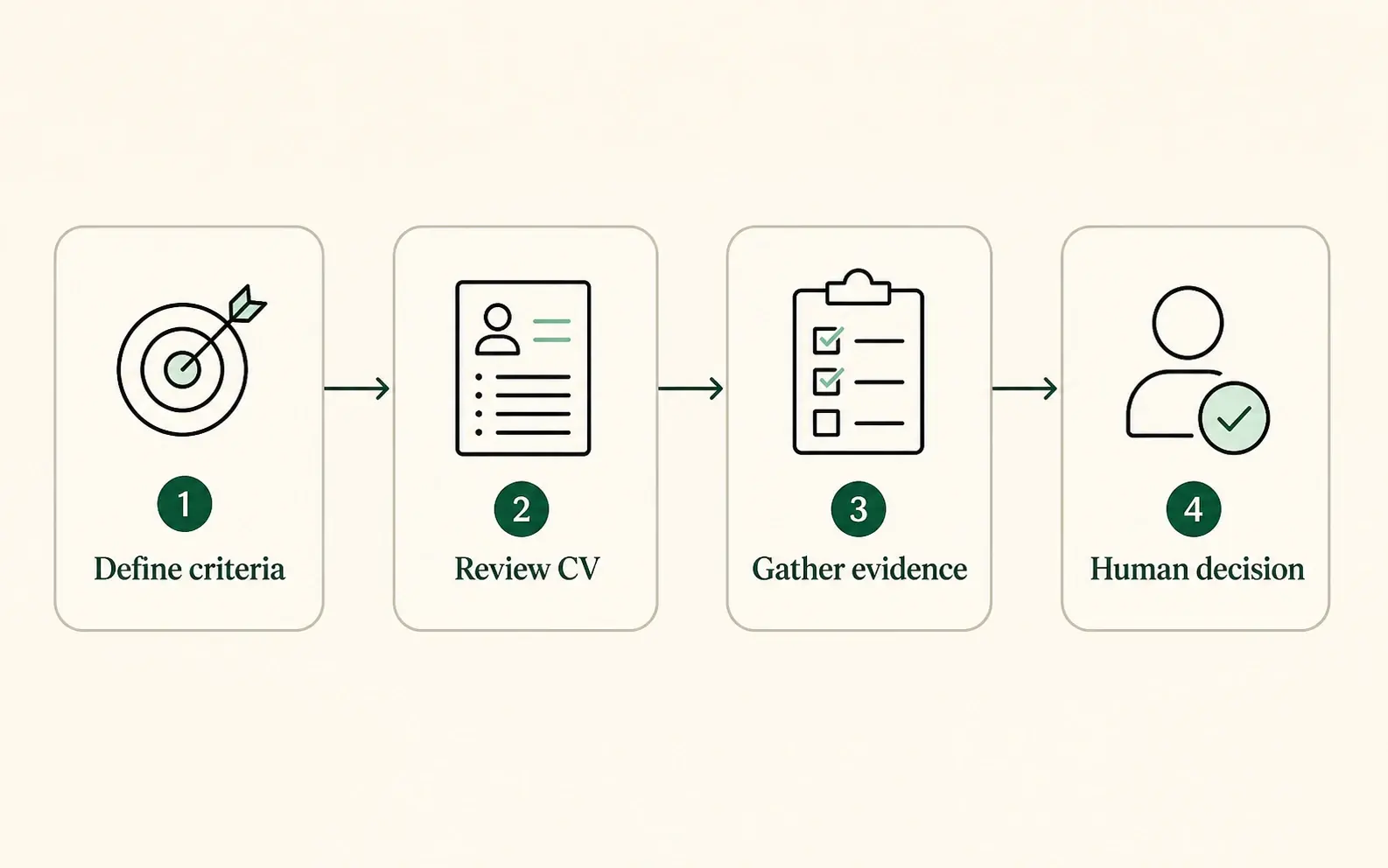
The sequence
The workflow belongs after the premise: agree the role criteria, use the CV as an initial signal, gather evidence in conversation, then keep the decision human.
The seven-step candidate screening checklist
Use the same sequence for every role, then adapt the criteria and questions to the work. The process should make a hiring-manager handoff more useful, not turn a recruiter screen into a final interview.
01Step 01
Define the next decision before opening applications
Write one sentence that states what the screen is for. A useful version is: “After the first conversation, the recruiter decides whether the evidence supports a deeper interview with the hiring manager.” This keeps the screen proportionate: it is a focused checkpoint, not a compressed final interview.
- Name the person who makes the next decision.
- State the decision in plain language.
- Decide what should remain for the later interview stage.
- Agree how candidates can request help or an alternative route.
02Step 02
Turn the role brief into three to five criteria
Start with the work, not a generic list of personality traits. A CV can say that someone is strategic, collaborative or commercially minded. The screen should clarify what those claims mean in the context of this role.
| Criterion | Useful first-screen evidence |
|---|---|
| Month-end ownership | The part of the process the candidate owned, the scope involved and one specific improvement. |
| Judgment under uncertainty | How they made and communicated a decision with incomplete information. |
| Role motivation | Why the scope of this role is a logical next step. |
03Step 03
Review the CV consistently, but do not treat it as proof
CV review is a useful first pass. It can show chronology, claimed responsibilities, qualifications and prior environments. It rarely explains the candidate’s own contribution, the trade-offs they faced or how a result was achieved. Use the same initial pass for every application you decide to review.
- Review experience against the agreed criteria, not an idealised background.
- Mark claims that need context as questions, not conclusions.
- Keep notes factual and job-related.
- Do not use the CV as a proxy for communication style, motivation or fit.
For a deeper comparison of what a conversation adds beyond a CV, read AI pre-qualification interviews: a recruiter’s guide.
04Step 04
Gather evidence in a short first conversation
Give the candidate room to explain a relevant example in their own words. Ask one open question for each priority criterion, then follow up only where the answer needs context, ownership or outcome. For example: “Tell me about a month-end close you owned. What did you change, and what happened as a result?”
05Step 05
Clarify practical alignment early
Availability, location, working pattern, salary expectations and work authorisation may be relevant before a full interview. Treat them as practical constraints to clarify, not a way to reduce the candidate to a filter. Tell candidates why you are asking and how the answer will be used.
- Ask only for constraints that are relevant at this stage.
- Use the same core questions for comparable candidates.
- Explain the purpose where it may not be obvious.
- Record the answer accurately rather than inferring it.
06Step 06
Review source evidence, not only a summary
A summary is useful when it points back to the candidate’s actual answer. It is not useful when it hides uncertainty behind a score. Before moving someone forward, the recruiter should be able to see which criterion the conversation addressed, what the candidate said, what remains unproven and what a human interviewer should explore next.
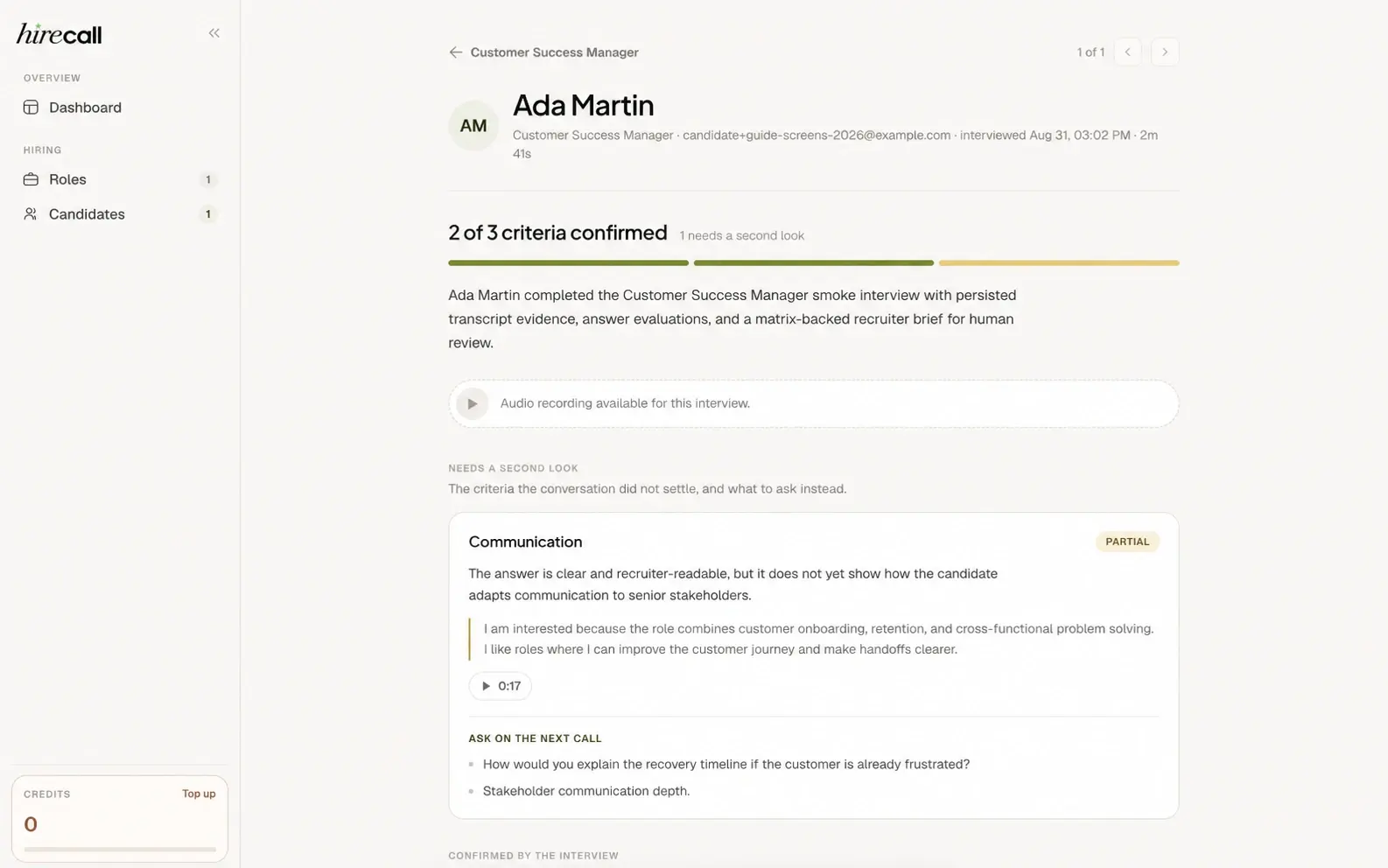
Inside HireCall
A recruiter can inspect what was confirmed, the candidate’s original answer and the next question to explore — rather than rely on a standalone score.
07Step 07
Make and record a human next-step decision
Use the checklist to support a clear next step: progress to a human interview, keep the candidate in consideration while information is gathered, or close the process with appropriate communication. The decision note should say what the role-relevant evidence established and what did not.
Copy-and-paste checklist
Use this version in a recruiter intake document, role brief or screening plan.
Before applications are reviewed
- The next screening decision is written down.
- Three to five job-relevant criteria are defined.
- Useful evidence is described for each criterion.
- The hiring team agrees what belongs in a later interview.
During the first conversation
- Every candidate receives the same core, role-relevant questions.
- Follow-ups ask for context, personal contribution and outcome.
- Candidates understand the format, recording and review process.
Before a candidate progresses
- The recruiter can inspect the evidence behind the brief.
- Uncertainty is visible rather than converted into a score.
- A person owns the progression decision.
- The hiring manager receives the most useful unresolved question.
Four screening mistakes that weaken a shortlist
Starting with generic questions
Start with the role outcome and criteria, then write the few questions that could change the next decision.
Treating a CV as a complete account
A CV is a useful summary, not a transcript of what the candidate owned. Use the conversation to clarify scope, decisions and result.
Hiding the use of AI or recording
Candidates should know who conducts the conversation, what is recorded, who reviews the answers and how to request an alternative route.
Delegating the decision to a score
Automation can organise evidence. It should not make a high-impact hiring decision or hide the candidate’s answers and unresolved questions.
Candidate screening checklist FAQ
How many criteria should a candidate screening checklist include?
Start with three to five. The right number is the smallest set that can support the next decision. More criteria usually mean a longer, less focused screen and less consistent evidence.
What should a recruiter verify during candidate screening?
Verify role-relevant experience, the candidate’s own contribution to relevant work, practical alignment and what remains to be explored in a human interview. Avoid treating unrelated personal information or broad impressions as evidence.
Can AI be used for candidate screening?
AI can support the repeatable first conversation when the hiring team controls the criteria and questions, candidates understand the experience and recruiters can inspect the source evidence. People should interpret nuance and make every progression decision.
Ready to test the flow?
Build a first conversation from the role you are hiring for.
Gather evidence candidates can explain in their own words, then let a recruiter decide what happens next.
See how HireCall works